Guide
Do QR Codes Expire? Static vs Dynamic QR Codes Explained
You printed a QR code on a menu, a poster or a business card, and now it opens an error page or a sign-up screen. Whether that can happen depends on the kind of code you made. This guide explains static and dynamic QR codes, why codes stop working, how to check yours, and how to make one that keeps working.
Published
Static and dynamic QR codes
Both kinds look the same on paper. The difference is what is stored in the pattern:
| Question | Static QR code | Dynamic QR code |
|---|---|---|
| What the pattern stores | Your web address or text itself | A short link on the QR company’s website, which forwards to your page |
| Can it expire? | No. Only the page it points to can disappear | Yes, if the company stops forwarding the link, for example when a trial or plan ends |
| Change where it goes after printing? | No | Yes, in the company’s dashboard |
| Count how many people scanned it? | No | Usually, through the company’s dashboard |
| Needs an account? | No | Yes |
Companies that sell dynamic codes describe the same split. One explains that a dynamic code holds a short forwarding link that the company controls, while a static code needs no server, forwarding link or subscription5. Another says dynamic codes can be switched off when a free trial ends, a paid plan lapses or an account goes over its limits4. Both say that renewing the plan switches the codes back on.
Why a QR code stops working
- The trial or plan ended (dynamic codes only). The short link stops forwarding, and scans land on an error or upgrade page. One lapsed account can switch off every dynamic code on it at once5.
- The page it points to is gone. A static code still scans, but the web page was deleted or moved, or the domain name was not renewed.
- The code was printed too small, or with too much in it. A long web address makes a denser pattern with smaller squares, which is harder to read from a distance.
- The white border was cropped. Scanners need a blank margin four squares wide on every side2. Placing the code against a busy background, or trimming the border to save space, can stop it scanning.
- Poor contrast or damage. Light squares on a light background, glossy glare, scratches or a fold through the code.
How to tell which kind of code you have
Scan it with your phone’s camera and look at the address the phone shows before you open it. On an iPhone, the Camera app shows the link and you tap it to open3. If your scanner opens links straight away, read the address in the browser’s address bar instead.
- If it shows your own web address (for example, your website or menu page), the code is static.
- If it shows a short link on the QR company’s domain, the code is dynamic, and it depends on that company’s account.
If a printed dynamic code has already stopped working, your choices are to renew the plan with that company, or to make a new static code and reprint.
How to make a QR code that doesn’t expire
- Open the QR Code Generator. There is no account and no sign-up.
- Choose Link for a web address, or Text for anything else, such as a short message, an address or a phone number.
- Type or paste the address under Web address. If you leave out https://, it is added, and the page shows the exact address the code will open.
- Leave Error correction on Medium, or choose High for a code that may get scuffed or dirty (see below).
- Download the PNG (choose up to 2048 × 2048 px under PNG size) or the SVG, which stays sharp at any print size.
- Scan the downloaded code with your own phone before you print or share it.
The code is made in your browser. The address or text you type is not sent to ToolSolvo or anyone else, and nothing counts your scans. Because the address itself is in the pattern, the code keeps working even if ToolSolvo were to close.
Tips for printing a QR code that scans
- Keep the link short. In our test, a short web address made a code 29 squares wide, while a 420-character address made one 81 squares wide at the same setting. Fewer, larger squares are easier to read when printed small.
- Keep the white border. The downloaded code already has the four-square border around it. Don’t crop it, and don’t place the code over a photo or pattern.
- Dark on light. ToolSolvo’s codes are black on white, which scanners read most reliably.
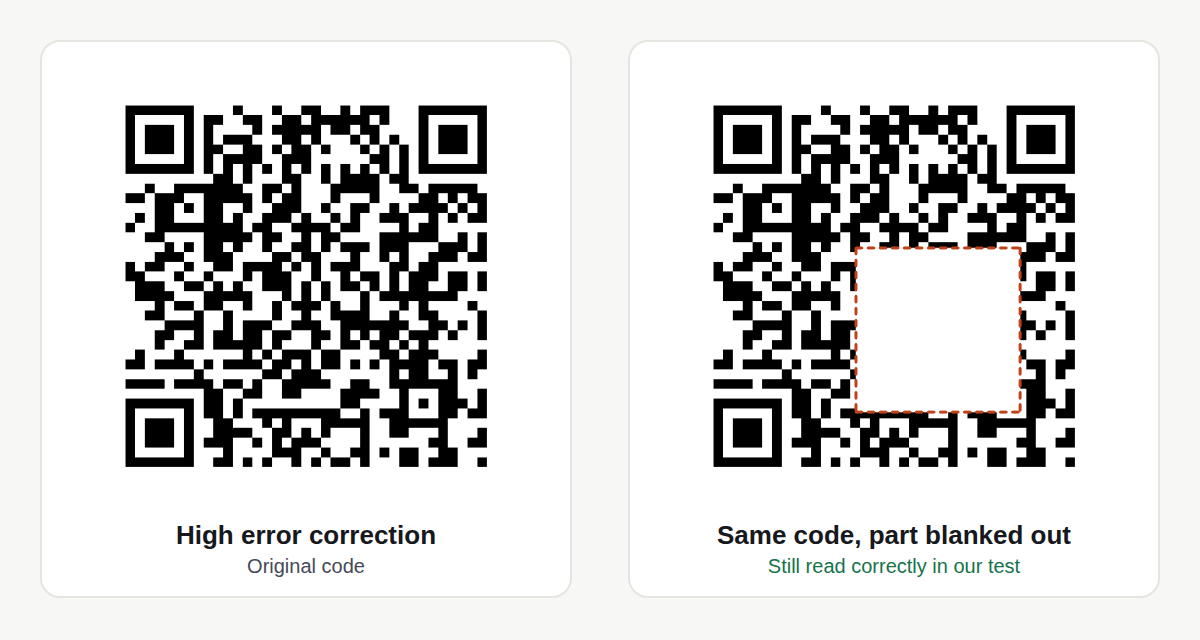
- Choose error correction for where it will be used. The four levels, Low, Medium, Quartile and High, can rebuild about 7%, 15%, 25% and 30% of the code’s data if part of it is damaged1. Higher levels make the pattern denser, so use High only where the code may get scratched or dirty.
- Use the SVG for print. It stays sharp at any size; a small PNG enlarged for a poster can turn blurry.
- Test at the final size. There is no single minimum size that suits every printer, phone and distance. Print one copy, then scan it from where people will actually stand.
What happened in our test
This is one test on 14 October 2026, using the QR Code Generator in Chromium and reading the downloaded codes with the QR decoders in OpenCV, an open-source computer-vision library. Phones may read codes slightly differently:
| What we did | Result |
|---|---|
| Link mode, typed toolsolvo.com/blog/ | The page added https:// and said so. The decoded code contained exactly https://toolsolvo.com/blog/, with no forwarding link in between |
| Text mode, an address and phone number | Decoded word for word |
| Text mode, Urdu text | Decoded correctly |
| 2,331 characters at Medium | Accepted. One more character was refused, with a message giving the limit |
| Same short link at Low, Medium, Quartile and High | 25, 29, 29 and 33 squares wide |
| Blanking out a growing square of the code | Still read with up to about 3% of the code covered at Low, 6% at Medium, 12% at Quartile and 20% at High |
| Network traffic while making codes | No request contained the link or text; the only requests were for ToolSolvo’s own pages |
Scanning QR codes safely
Anyone can print a QR code, including scammers, who stick their own codes over real ones on parking meters or send them in messages. The US Federal Trade Commission advises6:
- Check the web address your phone shows before opening it, looking for misspellings or swapped letters.
- Don’t scan codes in emails or texts you weren’t expecting, especially ones that push you to act now.
- Keep your phone’s software up to date, and protect accounts with strong passwords and two-step sign-in.
Common questions
Do free QR codes expire?
A free static code does not. A code made during a free trial of a dynamic QR service can stop working when the trial ends. Scan the code and look at the address: if it is a short link on the QR company’s domain, it depends on that company.
Can I change where a static QR code goes?
Not the code itself. You can change the page it points to, so link to a page on your own website that you can edit.
Can a QR code open a PDF or a menu?
Yes, if the PDF or menu is online. Put it on your website or a file-sharing service, make sure the link opens for anyone, then make a Link code for that address. A QR code holds at most 2,953 bytes, so it can’t hold the file itself.
How much text can a QR code hold?
Up to 2,953 bytes at Low error correction and 2,331 at Medium. English letters take one byte each and Urdu letters two, so long Urdu text fits less. Long content makes a dense code, which needs to be printed larger.
Does ToolSolvo track who scans my code?
No. The code holds your address or text directly, with no ToolSolvo link in between, so ToolSolvo never sees a scan.
Sources
- DENSO WAVE (developer of QR Code): QR Code standardization and error correction — error-correction levels L, M, Q and H restore about 7%, 15%, 25% and 30%; ISO/IEC 18004 standard (2000).
- DENSO WAVE: Point for determining the code area — a margin four modules wide is required on all sides of the code.
- Apple Support: Scan a QR code with your iPhone or iPad — the Camera app shows the link, which you tap to open.
- QR Code Generator (a seller of dynamic QR codes): Do QR Codes Expire? — dynamic codes can become inactive when a free trial ends or a plan lapses; static codes need no subscription.
- Uniqode (a seller of dynamic QR codes): Do QR Codes Expire? — dynamic codes encode a short redirect link the platform controls; a lapsed subscription can deactivate every dynamic code on an account.
- US Federal Trade Commission: Scammers hide harmful links in QR codes to steal your information (6 December 2023) — check the address before opening, avoid unexpected codes, keep software updated.